Copy Trading
The mql5.com Signals service allows users to subscribe to my signals and automatically copy my trades.
Subscribing is simple, I've included some links with explanations, and you can search on YouTube to see videos on how to set it up in your language, but I don't have explanations on YouTube.
Website with my Signals: https://www.mql5.com/en/users/tec_daniel/seller
How to Subscribe to Signals: https://www.mql5.com/en/articles/523
FAQ about the Signals: https://www.mql5.com/en/forum/10773
Further on you will find important information about the account type, VPS, lot calculation, details of my signals, etc.
You may choose any broker for your account, it does not need to be the same broker I use. Prefer brokers with low spreads and low commissions. Your account must be a Hedge type account, with leverage equal to or higher than the leverage on my account, and it must not be a FIFO type account (only a few brokers use this model).
You need to choose a signal that corresponds to the same MetaTrader type as your account (MT4 or MT5). My signals use the same strategy on both platforms according to their names. For example, NoPain MT5 follows the same strategy as NoPain MT4.
Each signal has in its description the percentage it is seeking for, the symbol traded, the minimum balance, and the minimum leverage.
For copy trading to function continuously, MetaTrader must remain running at all times, as it does not operate in the cloud. The best practice is to use a Windows VPS. You may subscribe to the VPS service provided by mql5.com or use any other Windows VPS provider of your choice, such as https://www.vps-mart.com (Windows Server VPS).
The copy trading subscription costs 30 USD, and you must also factor in the cost of your VPS. Therefore, check the signal’s description and its average monthly returns, then calculate the expected profit based on your account balance to determine whether the service is viable for you.
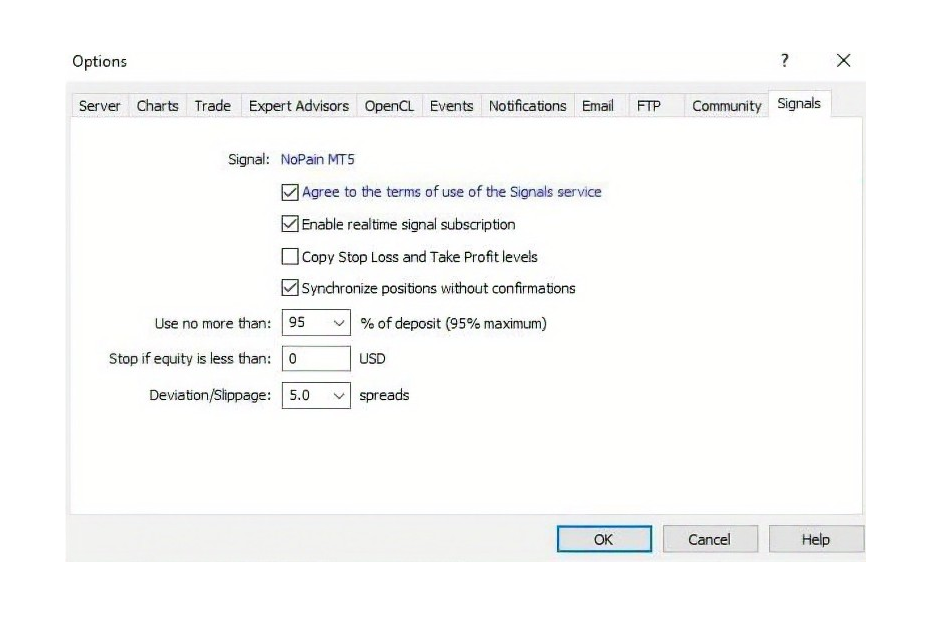
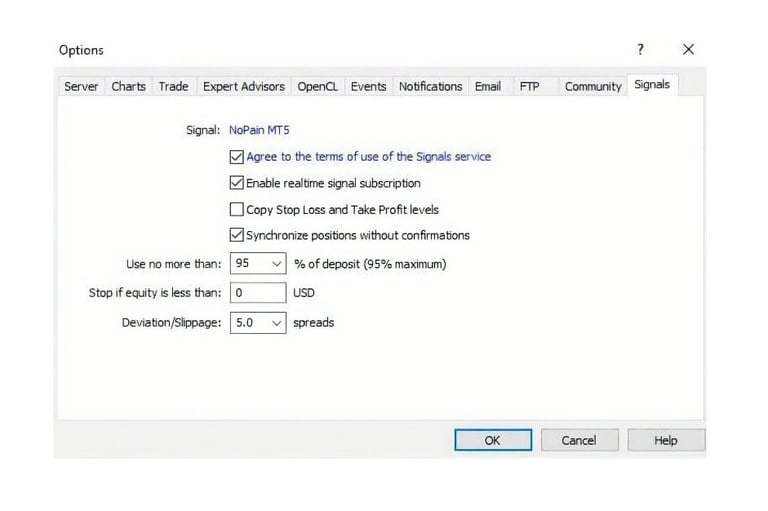
On MetaTrader, configure the Signals tab as shown in the image below. It is important to increase the Deviation/Slippage value so that trades are not blocked when your spread is high.
The formula used to calculate the lot multiplier is:
% of deposit * your account balance / my account balance
The result of this equation is used to multiply the lot size from my account, generating the lot size that will be opened on your account.
Example 1, when your balance is equal to or greater than the minimum balance:
Your account balance is 10,000 USD, and in MetaTrader you set 50% of deposit to be used.
You are copying NoPain, which requires a minimum balance of 1,200 USD (the balance maintained in my account).
0.5 * 10,000 / 1,200 = 4.17
So, when I open 0.01, your account will open 0.04 (4.17 times higher, rounded down).
Example 2, when your balance is less than the minimum balance (DON'T DO THAT):
Your account balance is 1,000 USD, and you set 50% of deposit.
You are copying NoPain, which requires a minimum balance of 1,200 USD (the balance maintained in my account).
0.5 * 1,000 / 1,200 = 0.417
In this case, when I open 0.01, 0.02 or 0.03, your account will still open 0.01, because this is the minimum lot size.
As a result, your lots sizes will not scale proportionally with mine. When I close several grid trades in profit, your account may end up closing at a loss because, for example, a profit of 0.03 on my side will be larger than a profit of 0.01 on your side, and this smaller profit will not be enough to offset the loss from the negative trade.
This is why your account must have a balance equal to or greater than the minimum balance (the balance I maintain on my account).
The mql5.com does not allow multiplying the copied trade size to increase lots and profits, unlike some other platforms. This restriction exists to prevent users from unintentionally increasing the risk of copy trading.
Your account’s leverage must be equal to or higher than the minimum leverage (the leverage used on my account). If your leverage is lower, the lot multiplier will automatically be reduced due to your lower free margin.
Avoid problems by not subscribing with values below the minimum mentioned above. Explained in the Article https://www.mql5.com/en/articles/618 In: Managing Funds or How to Select a Deal Volume?
Lot Calculation
Copy trading is available on various platforms and brokers, the advantage of mql5.com is that I can make all my accounts available, regardless of the broker used for each account.
However, I also make some copy trading available on the brokers I use, but it's only permitted to use the accounts on those brokers, so not all of my copy trading is there.
Each platform and broker has its own commissions and different copy trading configuration options, but in most cases I charge a 20% commission on the profit earned by the follower.
You can assess whether these options below are suitable for you:
BROKERS:
UpFuji: https://roboforex.com/es/copy-trading/rating/aaal/25002389
NoFear: https://roboforex.com/es/copy-trading/rating/aaaj/75071048
UpEverest and UpEverest: https://www.fpmarkets.com/
UpEverest and NoFear: https://trk.pepperstonepartners.com/aff_c?offer_id=367&aff_id=39806
NoPain and UpFuji: https://my.tickmill.com?utm_campaign=ib_link&utm_content=IB22045951&utm_medium=Open+Account&utm_source=link&lp=https%3A%2F%2Fmy.tickmill.com%2Fpt%2Fsign-up%2F
PLATFORMS:
NoStress: https://www.signalstart.com/analysis/nostress/268029
UpFuji: https://www.signalstart.com/analysis/upfuji-mt4/280438
UpEverest: https://www.signalstart.com/analysis/upeverest-mt4/274996
MinorForce: https://www.signalstart.com/analysis/minorforce-mt5/280441
RetireNow: https://www.signalstart.com/analysis/retirenow/266636
TriForce: https://www.signalstart.com/analysis/triforce-mt5/280442
MajorForce: https://www.signalstart.com/analysis/majorforce/274492
NoPain: https://www.zulutrade.com/trader/429718/trading?t=10000&m=1
NoStress: https://www.zulutrade.com/trader/428643/trading?t=10000&m=1
NoStress: https://www.zulutrade.com/trader/430569/trading?t=10000&m=1
UpFuji: https://www.zulutrade.com/trader/430557/trading?t=10000&m=1
RetireNow: https://www.zulutrade.com/trader/428586/trading?t=10000&m=1
TriForce: https://www.zulutrade.com/trader/430570/trading?t=10000&m=1
Robot, NoStress and PainGain (UpEverest): https://ctrader.com/pt/profile/ToTheMoonRobot